
A good title can double your click-through rate on the exact same video. If you’ve ever stared at the YouTube upload screen with no idea what to call your video, these 10 ChatGPT prompts for YouTube titles will get you unstuck in under two minutes. Here’s how to use them, plus how to pick the winner from the options ChatGPT gives you.
Quick Answer
Paste your video topic into ChatGPT with one of the prompts below, generate 10–15 options, then pick based on: curiosity gap, keyword relevance, and length (under 60 characters so it doesn’t truncate on mobile). Never publish the first title ChatGPT gives you — always generate a batch and compare.
The 10 Prompts
1. The Curiosity Gap Prompt
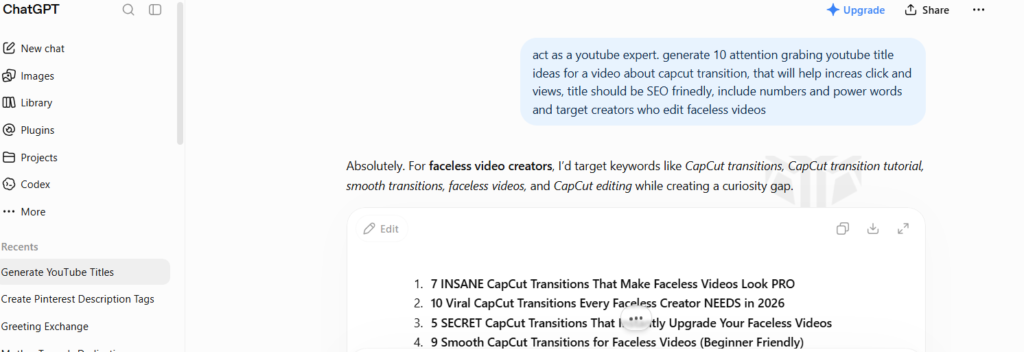
“Give me 10 YouTube titles for a video about [topic] that create a curiosity gap without being clickbait. Avoid giving away the full answer in the title.”
2. The Numbered List Prompt
“Write 10 numbered-list-style YouTube titles for a video about [topic], similar to ‘7 Mistakes Beginners Make When…'”
3. The Before/After Prompt
“Generate 10 YouTube titles that use a before/after or transformation angle for a video about [topic].”
4. The Mistake/Warning Prompt
“Write 10 YouTube titles that warn viewers about a common mistake related to [topic].”
5. The Comparison Prompt
“Give me 10 YouTube titles comparing [Option A] vs [Option B] for [audience/use case].”
6. The Question Prompt
“Write 10 YouTube titles phrased as questions that [target audience] would search for about [topic].”
7. The Time-Bound Prompt
“Generate 10 YouTube titles for [topic] that include a specific timeframe, like ‘in 5 minutes’ or ‘2026 update.'”
8. The Personal Story Prompt
“Write 10 YouTube titles for [topic] that hint at a personal result or story, like ‘How I…’ or ‘I tried…'”
9. The Beginner-Friendly Prompt
“Give me 10 YouTube titles for [topic] specifically targeted at complete beginners who feel overwhelmed.”
10. The A/B Test Prompt
“Take this title: [your draft title]. Give me 5 alternative versions that test different emotional hooks — curiosity, urgency, and value.”
How to Pick the Winning Title
- Generate options using 2–3 different prompts above — mixing angles gives you more variety than one prompt alone.
- Cut anything over 60 characters — YouTube truncates titles on mobile search and suggested videos.
- Check the title includes your main keyword near the front, not buried at the end.
- Read it out loud — if it sounds like something a person would actually say, keep it. If it sounds like an ad, cut it.
- If you’re unsure between two, use YouTube’s A/B testing feature (under Studio > Content > Test & Compare) if your channel has access.
Prompt Type Comparison
| Prompt Style | Best For | Risk |
|---|---|---|
| Curiosity Gap | Entertainment, tutorials | Can feel clickbaity if overused |
| Numbered List | How-to, listicle content | Can feel generic without a strong hook |
| Comparison | Reviews, tool breakdowns | Needs a real comparison to deliver on |
| Personal Story | Vlogs, results-based content | Only works if the story is genuine |
FAQ
Should I use the exact title ChatGPT gives me? Treat ChatGPT’s output as a starting point, not a final draft. It’s good at generating angles and structure fast, but it doesn’t know your specific audience or what’s already worked for your channel — always tweak the wording to sound like you. If you’ve published videos before, mention in your prompt what titles have performed well historically; ChatGPT can build on that pattern instead of guessing blind.
How many title options should I generate before choosing? Aim for at least 10–15 across a couple of different prompt styles. The first few outputs from any single prompt tend to sound similar, so mixing angles (curiosity + comparison + question, for example) gives you more genuinely different options to compare. If nothing stands out after 15, try rewording your topic description with more specific detail — vague inputs produce vague titles.
Does the title matter more than the thumbnail? They work together, not against each other — but the title is what shows up in search results and suggested feeds even before someone sees a thumbnail clearly, so it’s worth testing independently. A strong title with a weak thumbnail will still underperform, and vice versa — treat them as a pair, not a hierarchy.
- Why Your Shorts Aren’t Getting Views (and How to Fix It)
- How I Plan a Month of Content in One Afternoon
- Free Prompt Pack: 20 Prompts for Blog + Social Content
Save this list and swap in your own [topic] — works for Shorts titles too, just ask ChatGPT to keep it under 40 characters instead of 60.